
Celebrations
What happens when you finish a task, a parent task, a milestone or a whole plan, and how to turn the animations and sounds off.
Celebrations are small moments of feedback when you finish something. A checkbox pops, a stamp appears, and a short chime plays. The moment gets bigger as the thing you finished gets bigger. They are on by default, work on every plan, and you can turn them off.
What you see#
The size of the moment depends on what your last tick finished. There are four tiers.
| Tier | You finished | What plays |
|---|---|---|
| Task | A task | A small burst and the stamp "Yip! Done." |
| Parent task | The last open subtask of a parent, or a parent with every subtask done | A larger burst, with the same stamp |
| Milestone | The last open task linked to a milestone | A bigger stamp, "Milestone done.", or the milestone's name and "is done." |
| Plan | The last open milestone in a project's plan | Confetti with "Plan complete" and "Yipadoo!". Click it to dismiss |
Two things adjust a moment. If you give tasks a Size, bigger sizes make a bigger burst for a task or parent.
Time logged on the work can lift it. Add up every time entry on the task, on a parent it finishes and on everything under that parent. Entries count whether they came from the timer or were added by hand, and whoever logged them. At two hours or more, the moment moves up one tier. For a repeating task, only entries that started today count. A finished plan is already the top tier. A milestone or plan moment that was lifted this way also says "Two hours well spent." A lifted task or parent moment keeps the plain "Yip! Done." stamp.
The words in the interface change too. With celebrations on, the toast after you finish a task reads "Yipadoo! Task done." and the task panel says "Done. Yipadoo!". With them off, they read "Task completed." and "Done." An empty Today says "Day cleared. Yipadoo!" instead of "Day cleared."
If your device is set to reduce motion, the stamp stays still and goes away after a moment.
Surprise moments#
Now and then, a finished task gets an extra flourish with a different stamp: "Nice.", "Off the list.", "That's one." or "Yip!". Surprises are random, and never two within ten minutes. They only replace the small task moment, so finishing a milestone always plays the milestone moment.
Sounds#
Each tier has its own chime. A task gets a short ding. A surprise, a finished parent, a milestone and a plan each get a brighter chime, and the plan's is a short fanfare. The Yippee Timer's bell, at the end of a round or a break, is part of the same switch. See The Yippee Timer.
A browser only plays audio after you have used the page. If you hear nothing on a fresh load, click or press a key once.
Turn celebrations off#
- Open the account menu and choose Profile and settings.
- Open the Timer and celebrations tab and find Celebrations.
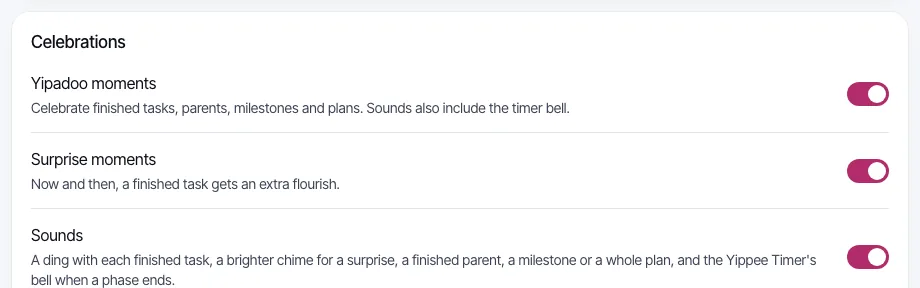
- Switch off Yipadoo moments to turn every celebration off: the animations, the stamps, the surprises, the sounds, the timer's bell and the "Yipadoo!" wording.
- To keep the moments and drop only some, leave Yipadoo moments on and switch off Surprise moments or Sounds.
Surprise moments and Sounds are greyed out while Yipadoo moments is off. They keep their own setting and come back as you left them when you turn it on again.
Note: These three switches are stored in your browser, not your account. Turning them off on your laptop does not change your phone or a second browser. Clearing your browser's site data brings the defaults back.